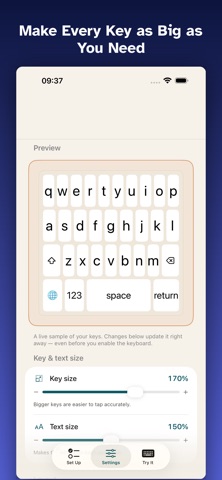
BiggerKeys is a keyboard built for hands that don't always cooperate.
If a tremor, Parkinson's disease, or another motor-control condition makes the standard keyboard feel like a moving target, BiggerKeys gives you bigger keys, more breathing room between them, and gentle features that quietly forgive the kind of mistakes a shaky hand tends to make. It was designed with the people who need it in mind, and it works in any app where you can type.
KEYS THAT FIT YOUR HANDS
Make the keys as large as you like and add as much space between them as you need. You set the size and spacing, so the keyboard fits you, instead of the other way around.
GENTLE ON TREMOR
BiggerKeys is built to reduce typing mistakes, not to judge them:
- Keys respond when you lift your finger, not the instant you touch down, so a brush against the wrong key won't type it.
- An adjustable debounce quietly ignores accidental double-taps on the same key.
- An optional dwell-to-confirm mode types a key only after your finger rests on it for a moment, for steadier, more deliberate input.
EASY TO SEE
Turn on the high-contrast theme and larger fonts for crisp, clearly outlined keys that are easy to read, including for low vision. A press-preview magnifier pops the key you're touching up above your finger so you can confirm it before you commit.
WORKS IN YOUR LANGUAGE
BiggerKeys follows your device's language automatically, so you get QWERTY, AZERTY, or QWERTZ as appropriate, and you can override the layout by hand whenever you prefer.
FEEDBACK THE WAY YOU LIKE IT
Optional sound on each key press helps confirm your typing, and works without any special permissions. If you'd like a physical buzz as well, BiggerKeys can add haptic feedback. This is the only reason it ever asks for Allow Full Access, and it is completely optional. Core typing always works without it.
PRIVATE BY DESIGN
Your words are yours. BiggerKeys has no network access, collects no data, and never logs or stores what you type, not on your device, and certainly not anywhere else. Nothing leaves your phone. Even if you enable Full Access for haptics, the keyboard still sends nothing, anywhere. There are no accounts and no tracking.
GETTING STARTED
Open the BiggerKeys app and follow the short setup. You'll add BiggerKeys in Settings, then switch to it with the globe key in any text field. Adjust the size, spacing, theme, and feedback in the app until it feels right, with a live preview that shows your changes as you make them.
A NOTE ON CARE
BiggerKeys is a typing aid, not a medical device, and it makes no medical claims. It's simply meant to make everyday typing a little easier and a little less frustrating, for the people using it and for the caregivers who help set it up.
We'd love your feedback. If something could be easier, tell us, and we'll keep making it better.