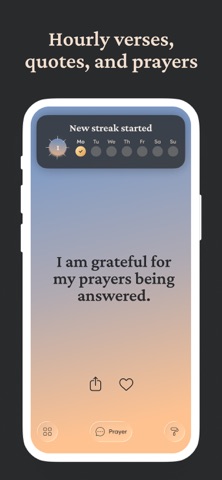
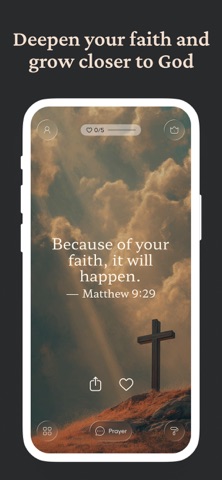
Since you are always on your phone... put God's word where you'll see it and watch what happens. Bible Widgets delivers the power of Scripture and prayers directly to your Home and Lock screens, turning every phone unlock into a moment of connection with God.
With beautifully designed, fully customizable widgets, you can wake up to a new Bible verse each morning, get thoughtful inspiration and quotes throughout your day, or pause for prayer whenever you need a spiritual lift.
Create personalized collections of favorite passages, set daily reminders at times that suit your schedule, and choose from a variety of themes and backgrounds to match your style. Even offline, your saved content remains accessible so a spiritual reflection is always just a tap away.
What you can expect from the Bible Widgets app:
Beautiful Widgets for your phone’s Lock and Home Screens
- Themes to match your phone’s aesthetic
- Display the category of your choice: from passages from God’s Word and verses of Scripture to prayers, quotes, and affirmations
Daily Reminders and Notifications
- Schedule reminders to match your daily routine
- Get Christian quotes throughout the day
Favorites and Collections
- Save your favorite Christian quotes to read later
- Create collections to organize verses, quotes, and prayers by theme
Themes, backgrounds & icons
- Animated, light, dark & seasonal themes
- Upload your own background photo or select from our gallery
Offline Access
- Read your saved content anytime, even when you’re not connected to the internet
One‑Tap Sharing
- Export spiritual quotes as images for social media or to share in private messages with your friends, family, and community
Browse thousands of Bible verses and Christian quotes organized by category:
+ Bible verses
+ Prayers
+ Affirmations
+ Quotes
+ Gratitude
+ Faith
+ Self-worth
+ Kindness
+ Letting go
+ Mental health
+ Hope
+ God
+ Mental toughness
+ Healing
+ Uplifting
+ Love
+ Grief
+ Feeling blessed
+ Inner peace
Unlock the full experience with Bible Widgets Premium:
- Remove ads
- Unlock all themes and categories
- Create custom themes with your own background images
- Get unlimited daily reminders
Your subscription will be charged to your Apple ID at confirmation of purchase and renew automatically unless auto‑renew is turned off at least 24 hours before the end of the current period. You can manage or cancel your subscription anytime in your device’s Settings.
Privacy Policy: https://monkeytaps.net/privacy
Terms of use: https://monkeytaps.net/terms