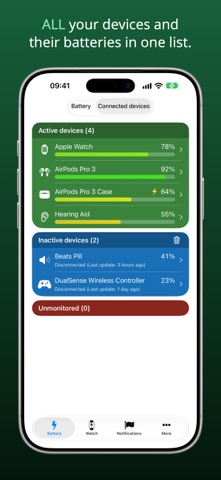
Battery Life shows the battery level of your iPhone, iPad, Apple Watch, AirPods and other connected devices in one place – in the app, in widgets and on your watch face. Downloaded by millions of users since 2014.
► BATTERY
• Battery charge in percent, charging state, thermal state and Low Power Mode
• Runtimes: how long the remaining charge lasts for video, video streaming, audio, web browsing and more, based on the figures Apple publishes for your model
• A step-by-step guide to the battery health and maximum capacity that iOS measures
► CONNECTED DEVICES
• AirPods and their charging case, Beats, keyboards, trackpads, game controllers, hearing aids and other accessories that report their battery over Bluetooth or cable
• The last reading stays visible after a device disconnects
• Give devices your own names and hide the ones you do not need
► WIDGETS (iOS 17 or later)
• Three widgets in different sizes for your Home Screen: Battery, Runtimes and Devices
• Lock Screen widgets for a glance without unlocking
• Pick the device to show, your favorite accessories and the sort order
► NOTIFICATIONS
• Get notified when your iPhone, iPad or Apple Watch has charged to the level you choose
• Get notified when a battery falls below the level you choose
► APPLE WATCH (watchOS 10 or later)
• The Watch app shows the battery level of your Apple Watch, your iPhone and your connected devices
• Complications for any watch face: Watch battery, iPhone battery or both
► BATTERY LIFE PRO (one-time In-App Purchase)
• No advertisements
• All notifications, including low battery and Apple Watch
• The larger Runtimes and Devices widgets
• Connected devices and raw data in the Watch app, plus the iPhone and combined complications
► PRIVACY
Your battery readings and your list of devices stay on your device. There are no accounts and no cloud.
► PLEASE NOTE
iOS and watchOS decide how often an app may run in the background. Notifications, widgets and complications therefore update on a schedule set by the system, usually every 5 to 60 minutes, and cannot show real-time values. Notifications need Background App Refresh, and they stop when the app is closed in the App Switcher.
► SUPPORT
Questions or feedback? Open Help (FAQ) or Send Feedback in the More tab.