Transform any room into your dream space with the power of AI. Snap a photo of your room and watch it transform into a beautifully redesigned space in seconds. Whether you're planning a renovation, redecorating, or just exploring ideas, this app makes interior design effortless and fun.
Choose from 20+ stunning design styles — Modern, Scandinavian, Industrial, Bohemian, Minimalist, Mid-Century, Japanese, Coastal, and more. See your room completely reimagined with professional-quality results powered by advanced AI technology.
— KEY FEATURES —
• AI Room Redesign: Upload a photo of any room and let AI transform it into a stunning new design. Choose your preferred style, and see results in seconds — no design skills needed.
• 20+ Design Styles: From Modern Minimalist to Cozy Farmhouse, explore a wide range of interior design styles. Each style is carefully crafted to deliver realistic, beautiful results.
• Before & After Comparison: Swipe to compare your original room with the AI-generated design. See the dramatic transformation side by side.
• Furniture Editor: Add new furniture, remove existing pieces, or swap items to match your style. Visualize exactly how different furniture looks in your space.
• Wall Color Preview: Try hundreds of paint colors on your walls before buying a single can. See exactly how each color looks in your actual room lighting.
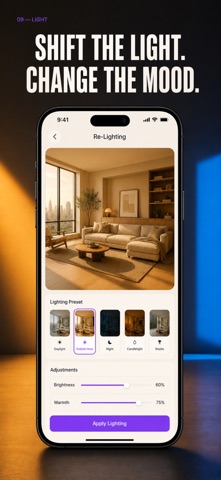
• Smart Lighting: Adjust the lighting mood of your room instantly. Preview warm, cool, bright, or ambient lighting to find the perfect atmosphere.
• Material Swap: Change flooring materials — hardwood, tile, marble, carpet — and wall textures with a single tap. See how different materials transform your space.
• AR Preview: Use augmented reality to see your redesigned room in real space. Walk around and experience the design before making any changes.
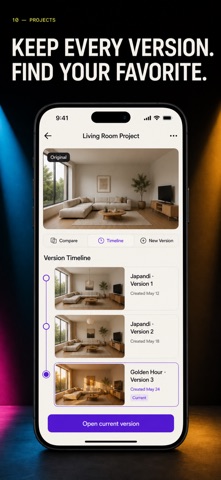
• Project Manager: Save unlimited designs, organize them by room or project, and revisit anytime. Keep track of all your design ideas in one place.
• Moodboard Creator: Collect inspiration, colors, and materials into beautiful moodboards. Plan your design vision before committing to changes.
— WHY USE THIS APP? —
Hiring an interior designer costs thousands. Paint samples, furniture returns, and renovation mistakes waste time and money. This app lets you experiment freely — try any style, color, or material risk-free before spending a dollar.
Perfect for homeowners, renters, real estate agents, and design enthusiasts. Whether you are staging a home for sale, planning a renovation, or simply refreshing your living space — see the result before you start.
— LEGAL —
Terms of Use: https://leanstudio.asia/terms-of-use
Privacy Policy: https://leanstudio.asia/privacy-policy
— SUPPORT —
Questions or feedback? Contact us at support@leanstudio.asia
Transform your space today — snap a photo and redesign any room with AI.